Fault description:
Sony ericsson Xperia X10 has a major charging problem some time we had noticed that mobile just shows charging indication on display but mobile drains battery quickly . In some cases after few minutes of charging it stops , in such cases we have to check hardware section so here we describe how to solve charging problem of Xperia X10 i .
Fault Solution:
There are four common solutions for this problem so we have to proceed step by step.
1. First we should change the battery because in some cases the battery has an internal problem in its circuitry and due to that we got an error.
2. Then we should try to change the charger becomes sometimes the charger's internal component gets short circuited, then the charger shows false charging and we get a false charging error.
3. Now open the mobile and clean the mobile PCB and charging connector, then check the charging.
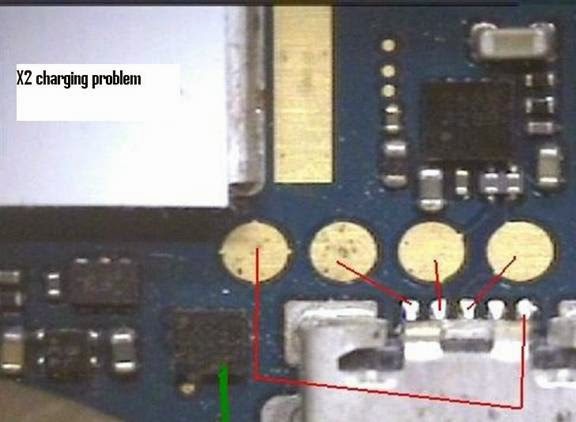
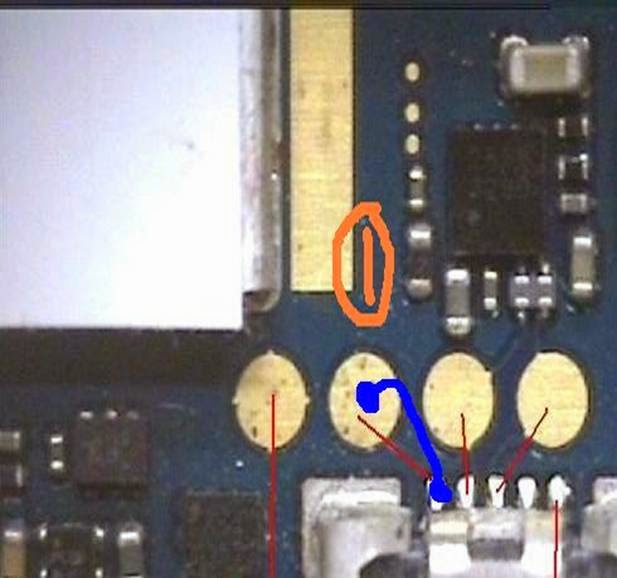
4. If the above tricks don't work then check the line continuity from charging point 1 to the transistor below this point show in the yellow mark. If there is no line then apply the jumper from point 1 to this transistor.
5. Check point 2 it should be grounded.
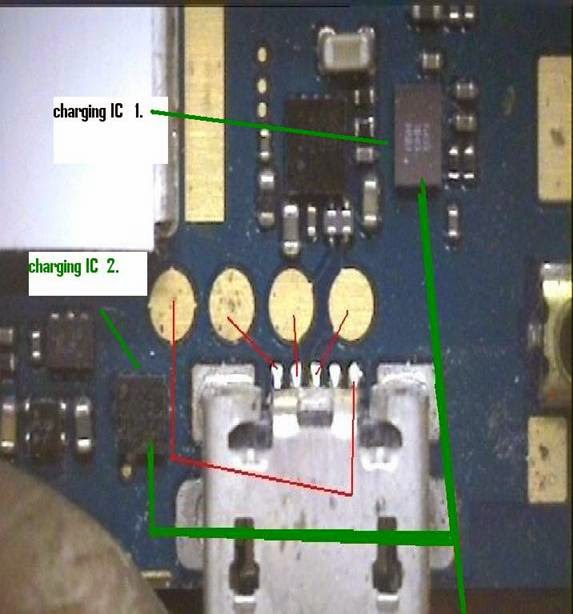
6. Now check charging point 5. It should have the line to the component below it shown in the green mark point 2. If there is no line then apply the jumper.
7. Now apply the jumper from the charging point and 4 to 4 point (ball) charging the IC on the upper side 2 point (ball) as shown in red mark and 4.
1. First we should change the battery because in some cases the battery has an internal problem in its circuitry and due to that we got an error.
2. Then we should try to change the charger becomes sometimes the charger's internal component gets short circuited, then the charger shows false charging and we get a false charging error.
3. Now open the mobile and clean the mobile PCB and charging connector, then check the charging.
4. If the above tricks don't work then check the line continuity from charging point 1 to the transistor below this point show in the yellow mark. If there is no line then apply the jumper from point 1 to this transistor.
5. Check point 2 it should be grounded.
6. Now check charging point 5. It should have the line to the component below it shown in the green mark point 2. If there is no line then apply the jumper.
7. Now apply the jumper from the charging point and 4 to 4 point (ball) charging the IC on the upper side 2 point (ball) as shown in red mark and 4.

8. After all of this is done, if the problem still remains then finally change the 4 point charging IC.
Conclusion:
For the charging problem solution we should follow all of the procedures step by step, because if we use step 4 and 5 first then there is a chance it could damage the mobile.
Just take things slow and do what's necessary step by step without rushing. You will solve the problem in the end, but you just have to be patient. Rushing things and making mistakes is only going to cause frustration and aggravation, and in the long run could end up causing permanent damage. It just isn't worth it to hurry through these steps.
And you should always check to make sure that the jumper wire is in good condition and the connectors are clean.
Just take things slow and do what's necessary step by step without rushing. You will solve the problem in the end, but you just have to be patient. Rushing things and making mistakes is only going to cause frustration and aggravation, and in the long run could end up causing permanent damage. It just isn't worth it to hurry through these steps.
And you should always check to make sure that the jumper wire is in good condition and the connectors are clean.