Home | Looking for something? Sign In | New here? Sign Up | Log out
Showing posts with label Sony ericsson mobile. Show all posts

Saturday, August 4, 2012

Sony Ericsson c702 mic not working solution

Fault description:
In sony ericsson c702 mobile some time mic does not work so there no voice to caller’s end.
This problem occurs due to physical problem like water damage or physical shock on mobile.

Fault solution:
For solving mic problem apply following solution step by step:
1.       First change new mic then problem might be solved.
2.       If still no solution then check track continuity from both mic point to mic resistance shown in image below  
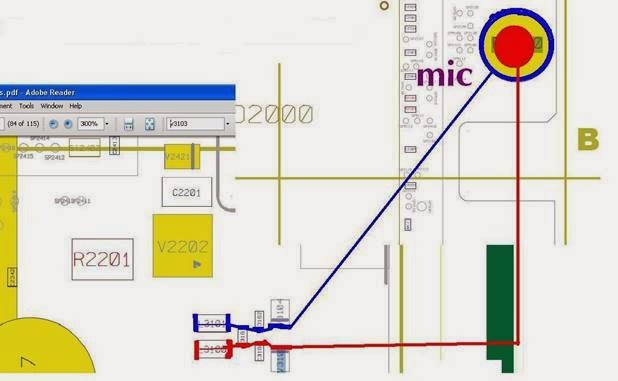

3.       First check track continuity from resistance L3101 shown in blue mark to mic’s positive point if there some problem in track then apply jumper as shown in image using blue line.
4.       Second check second track continuity from resistance L3100 shown in red mark to mic ‘s negative point if continuity missing there then apply jumper as shown with red line.

Now after all above tips and jumper setting mic will work properly without any problem.


Conclusion:
 Jumper setting is last solution for mic problem.  Because in Sony ericsson new generation mobile mic IC is inbuilt in CPU IC which is not changeable because it is shielded.

Wednesday, July 4, 2012

Sony ericsson X10i charging drains battery or stops

Fault description:
Sony ericsson Xperia X10 has a major charging problem some time we had noticed that mobile just shows charging indication on display but mobile drains battery quickly . In some cases after few minutes of charging it stops , in such cases we have to check hardware section so here we describe how to solve charging problem of Xperia X10 i .   
Fault Solution:
There are four common solutions for this problem so we have to proceed step by step.

1. First we should change the battery because in some cases the battery has an internal problem in its circuitry and due to that we got an error.

2. Then we should try to change the charger becomes sometimes the charger's internal component gets short circuited, then the charger shows false charging and we get a false charging error.

3. Now open the mobile and clean the mobile PCB and charging connector, then check the charging.

4. If the above tricks don't work then check the line continuity from charging point 1 to the transistor below this point show in the yellow mark. If there is no line then apply the jumper from point 1 to this transistor.

5. Check point 2 it should be grounded.

6. Now check charging point 5. It should have the line to the component below it shown in the green mark point 2. If there is no line then apply the jumper.

7. Now apply the jumper from the charging point and 4 to 4 point (ball) charging the IC on the upper side 2 point (ball) as shown in red mark and 4.


8. After all of this is done, if the problem still remains then finally change the 4 point charging IC.

Conclusion:
For the charging problem solution we should follow all of the procedures step by step, because if we use step 4 and 5 first then there is a chance it could damage the mobile.

Just take things slow and do what's necessary step by step without rushing. You will solve the problem in the end, but you just have to be patient. Rushing things and making mistakes is only going to cause frustration and aggravation, and in the long run could end up causing permanent damage. It just isn't worth it to hurry through these steps.

And you should always check to make sure that the jumper wire is in good condition and the connectors are clean.

Thursday, March 22, 2012

Sony ericsson w810i blinking red light gdfs file error solution

Fault description:

Sometime sony ericsson mobile just blink red light on upper side or sideways red light when we power on mobile and insert charger into mobile . This fault occurs due to gdfs file error. In sony ericsson mobile sometime due to wrong software update or memory card problem gdfs file corrupts and mobile just shows red light blinking. 

Fault solution:

This red light blinking problem is very complicated in these mobile we have to use setool or cruesior box for this problem quick solution
Here we take setool as example here.
Here are some simple steps for repairing red light blinking problem: 

A. First fully charge mobile battery and check problem
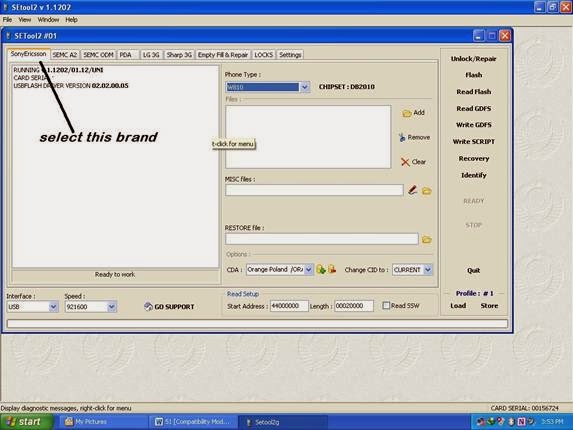
B. Secondly connect setool to computer and open setook software
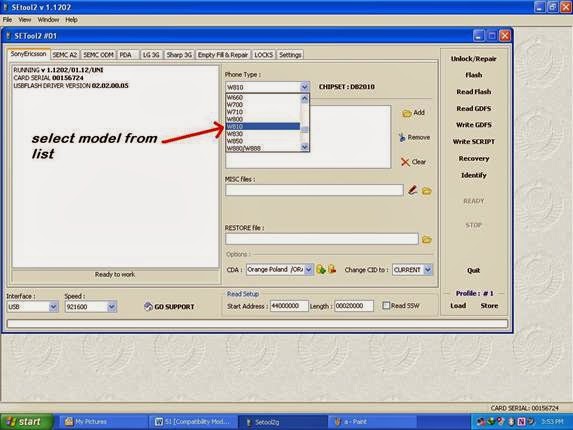
C. Now select brand from brand list and select model here we select w810i


D. This is a db2020 chipset mobile
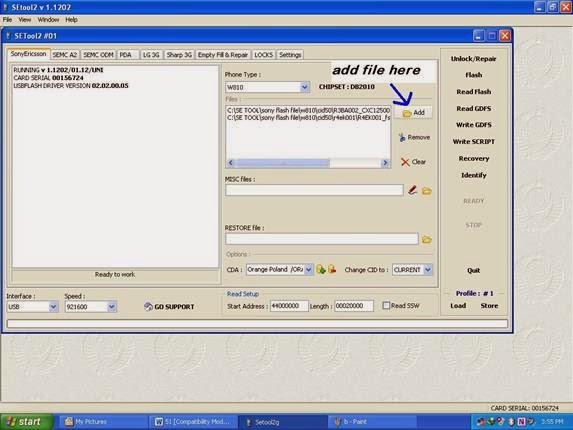
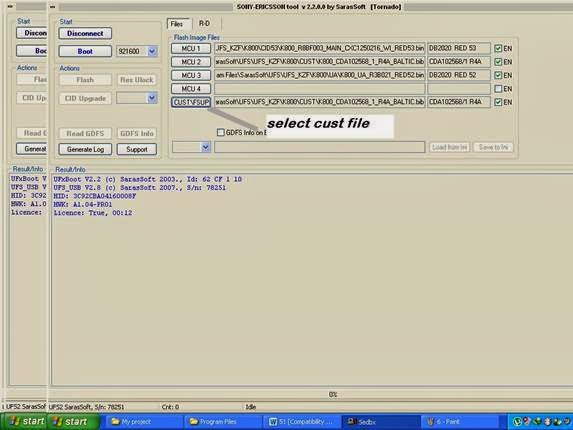
E. Now select bin file and fs file


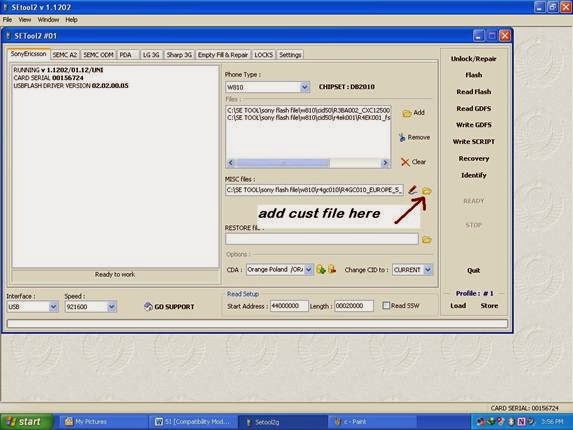
F. At last select cust file according to your country


G. Now go to setting tab 

H. Tick mark customized phone after flash


I.        Now select flash button then it will ask for mobile connection then connect mobile then box will full flash mobile and after all done it will shows all information correctly. Then check mobile now it should power on properly.


Conclusion:
Red light blinking problem is major problem so use always appropriate cust file according to your country region otherwise problem will remain same.

Sunday, February 26, 2012

Sony ericsson k800 logo hangs then power off solution

Fault description
Sony ericsson k800 mobile has hanging problem mostly. This problem appears due to Internet virus or installing unauthorized game or apps. In such case mobile just shows sony ericsson logo on main screen and then power off after few second. And even we cannot charge mobile due to corrupted software.

Fault solution
For solve this problem we have to use flasher box that support sony ericsson flashing like setool box,universal box,hwk etc . Here we use hwk box for flash sony ericsson mobile.
1. Connect box to pc
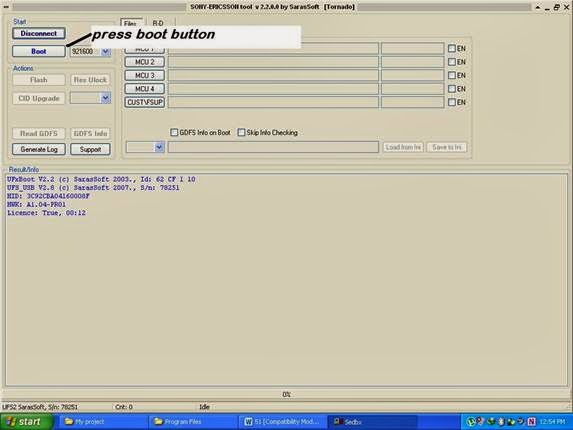
2. Open sony ericsson tool named SEdbx
3. Press boot button

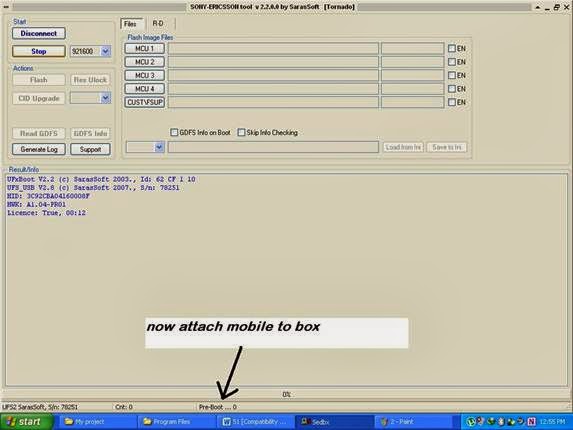
4. Now insert flash cable into mobile charging connector then box will detect mobile and will show all basic info about mobile like software version, phone cid,gdfs version etc.


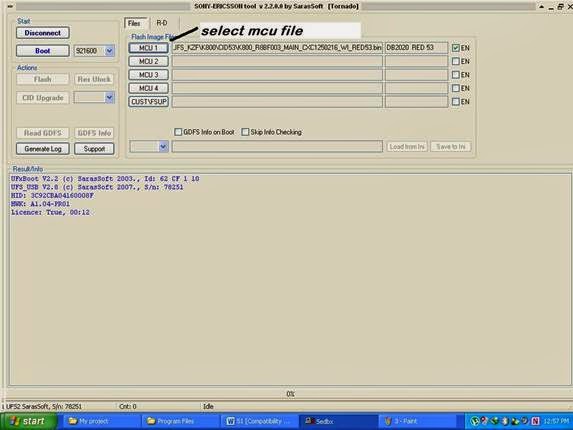
5. Now select flash file one by one. During selecting flash file we should take care about phone's cid and all file should be of same cid as mobile.
6. First select mcu bin file

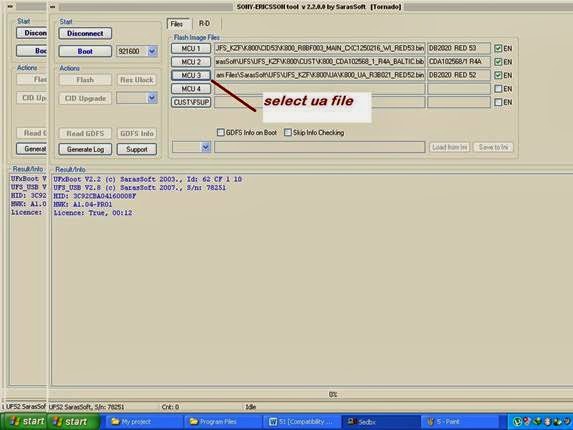
7. Then select fs file

8. Now select ua file

9. At last select cust file

10. Now press write flash button then box will start to upgrade mobile software and approx after 10 minuet all process will done and mobile will be in power on mode.      


Conclusion:
During flash file selection we should care about cid version. If we select wrong cid flash file then we will damage our mobile completely.
      

Popular Posts

Advertisement

Compare hotel prices and find the best deal - HotelsCombined.com